


If you’ve been using Claude to help you build apps, you’ve probably run into this problem: you ask it to do something one day and it nails it. You ask for the same thing next week and the output is completely different.
That inconsistency is about to disappear.
This week Anthropic released Claude Skills, a feature that lets you teach Claude to perform specific tasks the exact same way, every single time.
If, like me, you’re building apps with AI as your mentor and coding partner Skills are an upgrade.
Let me show you why.
What Are Claude Skills?
Claude Skills are instruction folders you create once and reuse forever.
Here’s how it works:
You write down the steps for a task (or let Claude write them for you)
Save it as a skill
Every time you ask Claude to do that task, it follows those exact steps
Example: You create a “debug-my-code” skill that tells Claude to:
Check for syntax errors
Look for logic issues
Test edge cases
Explain what broke in plain English
Now, every time you paste broken code, Claude debugs it the same way. Same checklist. Same format. Same quality.
Why This Matters If You’re Building Apps
Before Skills, using Claude for coding felt like working with a brilliant but unpredictable assistant. Some days it would write you clean, well-commented code. Other days, not so much.
Skills fix this by letting you set the rules for consistent output.
3 Ready-to-Use Examples for Prompt Driven Developers
Skill #1: Code Explainer
What it does: Takes any code snippet and explains it in plain English, line by line.
Why you need it: When you’re reverse-engineering code (the foundation of prompt-driven development), you need consistent explanations. This skill breaks down what every line does, what patterns it uses, and why it’s structured that way.
Setup time: 5 minutes
Saves you: 10-20 minutes per code review
Skill #2: Error Message Translator
What it does: Takes cryptic error messages and translates them into actionable fixes.
Why you need it: Error messages are written for experienced developers, not beginners. This skill reads the error, identifies the real problem and tells you exactly what to fix.
Example output format:
Error Type: [Syntax/Logic/Runtime]
What It Means: [Plain English explanation]
Where It Broke: [Specific line number]
How to Fix It: [2-3 options with trade-offs]
Setup time: 5 minutes
Saves you: Hours of frustration
Skill #3: Component Structure Validator
What it does: Checks if your React components follow best practices.
Why you need it: When you’re learning to build apps with AI, you don’t always know if the code Claude writes is good or just good enough. This skill validates:
Is state managed correctly?
Are props being used properly?
Is the component too big (should it be split)?
Are there performance issues?
Setup time: 10 minutes
Saves you: Catching bad patterns early (before they become big problems)
How Skills Compare to Everything Else
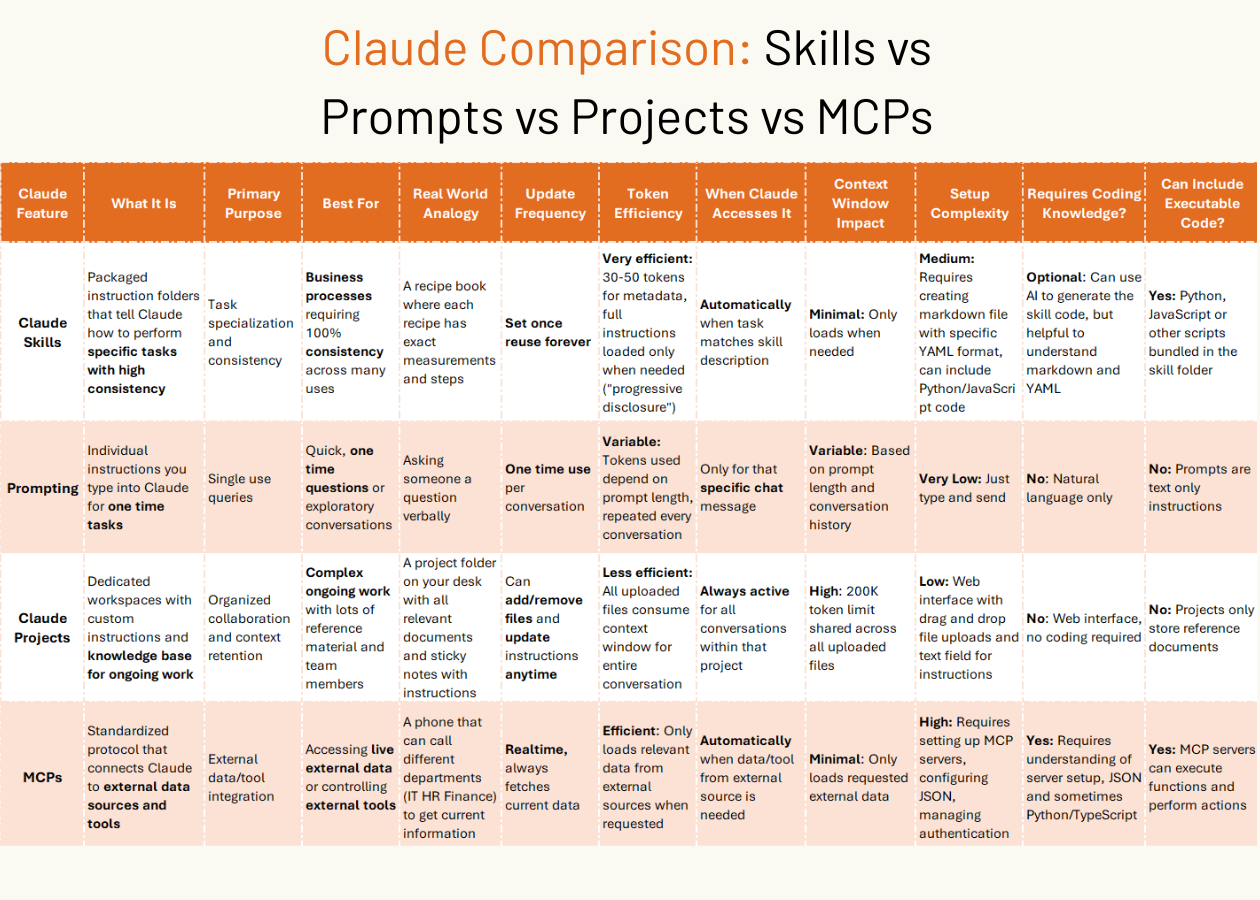
Claude now has four ways to work with it: Skills, Prompts, Projects and MCPs.
Skills = Consistency
Prompts = Conversation
Projects = Context
MCPs = Connections
Here’s a comparison table I made to help you understand the difference between all of the Claude features 👇

How to Create Your First Skill
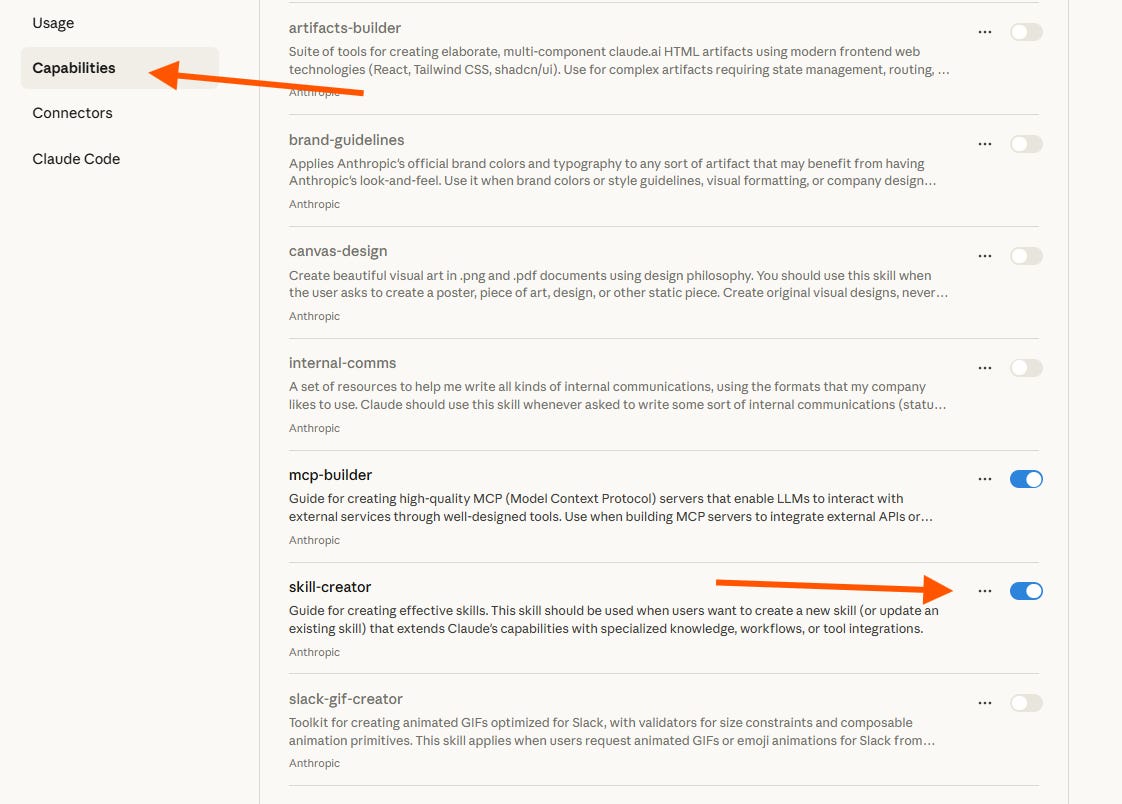
Navigate to you Claude settings → Capabilities → Toggle on ‘skill-creator’
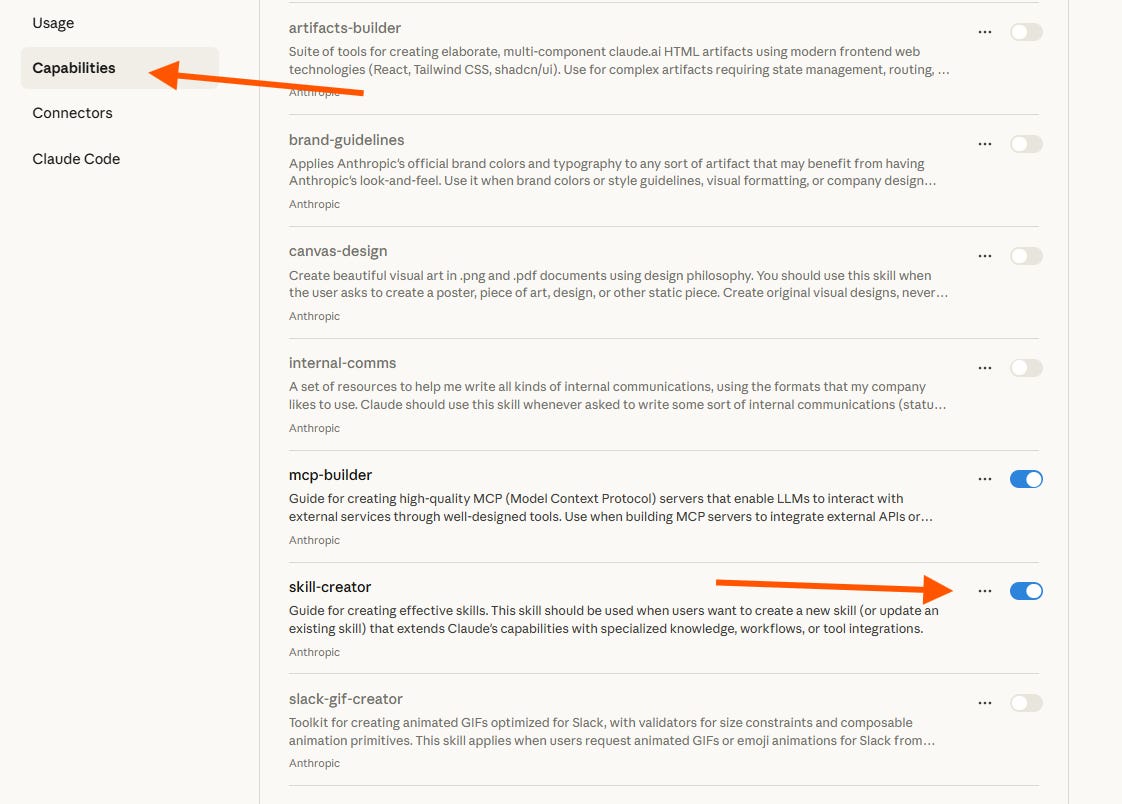
Click the three dots beside the toggle and click ‘Try in chat’
Tell Claude what you want the skill to do
Example: “Create a skill that reviews my code for common errors”Claude will draft the skill instructions
Save it as a zipped skill file (Claude will guide you through this)
Test it by uploading a code file and asking Claude to use the skill
That’s it. You now have a reusable code reviewer!
If you found this breakdown useful, forward it to someone who’s building with AI. The more people using Skills, the more examples we’ll all have to learn from.